

The AIS Password is required in case you are downloading your Annual Information Statement (AIS) on the income tax portal. The taxpayers face numerous challenges when attempting to open the AIS PDF file but it is not a complicated task at all when the right format is provided.
This article will describe the nature of an AIS password, its format, usage, and problems that are likely to occur.
What Is AIS Password?
The Annual Information Statement (AIS) is an in-depth account of your financial transactions i.e. your income, taxes, investments among others. This document is sensitive in terms of financial information and hence when it is downloaded in PDF format, it is secured using a password.

This file must be opened by the AIS Password and only the taxpayer should be able to access his/her confidential information.
AIS Password Format (Most Important)
The AIS password has a standard format which is dictated by the Income Tax Department.
Format:
PAN (lower case) + Date of Birth (DDMMYYYY)
- No spaces
- No character
Example:
- PAN: ABCDE1234F
- DOB: 15 August 1990
- Password: abcde1234f15081990
Both AIS and TIS reports are of this format.
Read Also: Redeemaibot. com: Complete Guide, Features, Safety & Alternatives
How to Open PDF AIS with AIS Password
In case you have downloaded your AIS file and are unable to open it, then take these few steps:
- Observe the downloading of the AIS PDF in the income tax portal.
- Use any PDF reader to open the file.
- Please enter your AIS Password (PAN + DOB format)
- Click submit to get your statement.
Make sure:
- PAN is typed in small-letter.
- DDMMYYYY Date of birth in this format.
The opening of the file can be blocked by a little inaccuracy.
Steps to Download AIS and TIS
To enter your AIS and TIS, you should do the following steps:
- Go to the portal on e-filing of income tax.
- Enter the PAN and password.
- Open Services Annual Information Statement (AIS).
- Click proceed to open AIS portal.
- Choose AIS or TIS and save the file.
AIS is available in PDF, JSON or CSV format.
Difference Between AIS and TIS
AIS is often confused with TIS by many users, although these two tools have slightly different purposes:
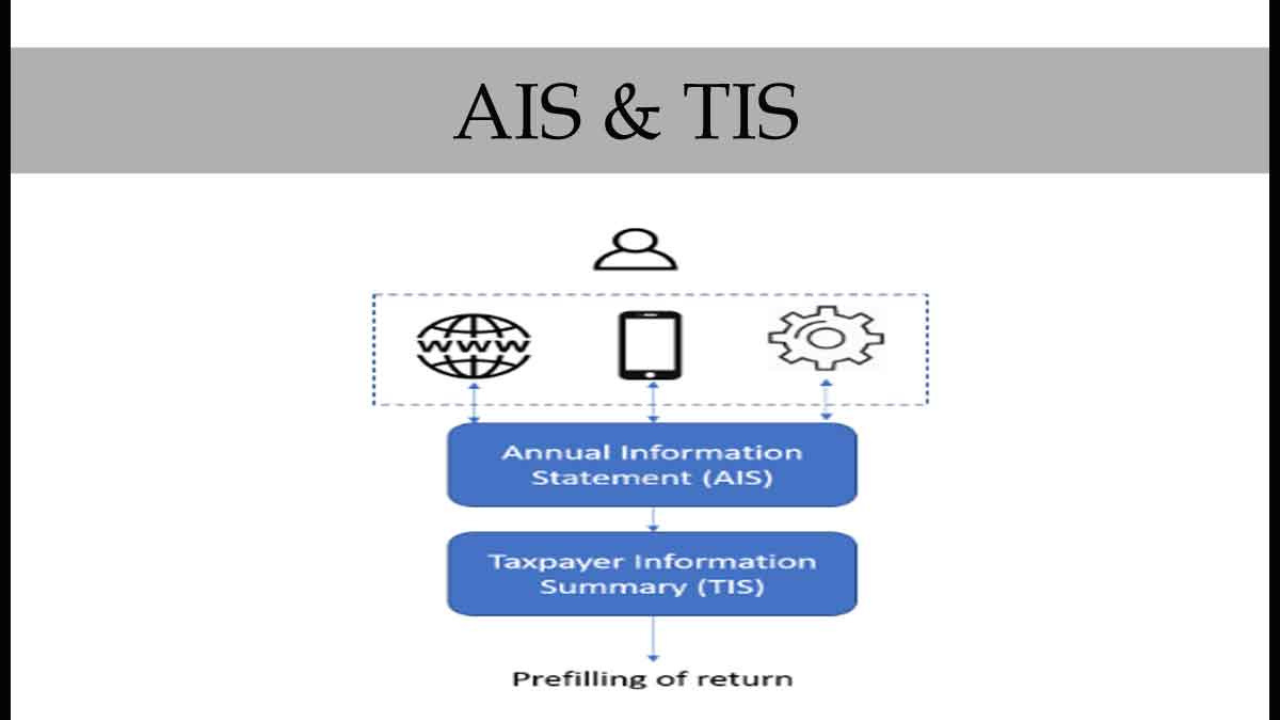
- AIS (Annual Information Statement): Tells you everything you do with your money.
- TIS (Taxpayer Information Summary): Provides you with a summary of your tax-related information.
They both would help in checking the information before you claim your income tax.
Why AIS Password is Important
Your financial information is highly secured by the AIS password.
The reason is as follows:
- Guarantees privacy and security of data.
- Eliminates unauthorized access.
- Assists you in checking financial information.
- Eliminates possibilities of taxation mistakes or notices.
AIS also assists in cross-checking your income details before filing your ITR thus being accurate.
Common Issues with AIS Password
AIS files have problems during opening among many users. The following are some of the common problems:
- Using uppercase letters instead of lowercase ones.
- Wrong format of date (not DDMMYYYY)
- Introduction of spaces or additional characters.
- Keying in incorrect PAN or DOB.
Quick Tip:
In case you have the issue with your password, make sure you are typing in the correct format, which is always PAN + DOB.
Tips to Use AIS Effectively
In order to maximize on your AIS:
- Check the information on the income and investments.
- Compare AIS data and your ITR.
- Record any wrong entries.
- Check it as a guide to filing taxes.
It is also advisable to check AIS on a regular basis in order to prevent mismatches and tax notices.
Final Word
The AIS Password is not complicated but essential in accessing your financial records without any form of interference. With a simple touch of the right format i.e. PAN in small letters and date of birth, you can easily access your AIS file without complications.
Always check the contents of your AIS before submitting your income tax return to make sure that everything is correct. Such a minor step will save you the mistakes, conflicts, and possible tax bills in the future.
Read More: Jokefool com: Guide About Jokefool com Entertainment Blog
